Pick the jobs you want, and Cvizo sends your CV and fills in the forms
Fill in your profile once. Then send the same CV to many postings at once, or ask Cvizo for a separate CV for each one. The forms fill themselves in, and all you do is check them and send.
The account is free and needs no card.
- 29 CV templates to choose from
- 24 form fields filled in for you
- Browser add-on coming soon to the Chrome Web Store
Your trade is on the list too: warehouse worker, nurse, teacher, accountant, designer, developer.
What Cvizo does for you
Application forms fill themselves in, even across several postings
The browser add-on types in your details and attaches the CV you choose: one for every posting, or a separate one for each. You check it and send it, or let Cvizo press send for you. The add-on is coming soon to the Chrome Web Store.
See how it worksThe form on the posting's own page
Contract type
Contract type
Jobs from company careers pages, matched to you
Cvizo searches company careers pages for you and puts the postings that fit your profile best at the top, each with a score that shows how close the match is.
See how it works24 postings matched to you
Data analysis, Kraków, B2B
-
Data analyst New
Fintech Nova · Kraków, hybrid · Careers page
91% match -
BI specialist New
Lipowa Group · Kraków, remote · Web search
84% match
Searched: company careers pages and postings on the web
A CV written for one posting when you want to stand out, scored before you send it
When one job really matters, Cvizo shapes your experience around what it asks for. The CV check shows how recruitment software will rate it, so you know what to fix before anyone reads it.
See how it worksWhether the robot will let your CV through
What it is made of
- Words from the posting 40
- Length 34
Missing from your CV
Everything else that helps with a job hunt
Each of these has its own page that shows how it works.
- CV check See how recruitment software will rate your CV before a person reads it.
- Application board All your applications on one board, from a saved posting to a job offer.
- Recruitment calendar Interviews, assessments and offers from all your applications in one calendar.
- Mock interview Practise with an AI that asks about the actual posting and tells you what to improve.
- Card for employers An anonymous card with your skills and what you are looking for, so employers reach out to you.
How to get started
-
Fill in your profile
Type in your experience or import the CV you already have. This is the only part that takes a few minutes.
-
Pick the jobs
From your matched postings, or pasted in by hand. The browser add-on, coming soon to the Chrome Web Store, saves a posting from a job board in one click.
-
Apply
Cvizo attaches the CV you picked or prepares a separate one for each posting, fills in the form and waits for you to press send.
Five layouts, five different people
Each of these CVs belongs to a different person in a different trade, because different experience looks better in a different layout. Every one is a finished PDF straight out of Cvizo.
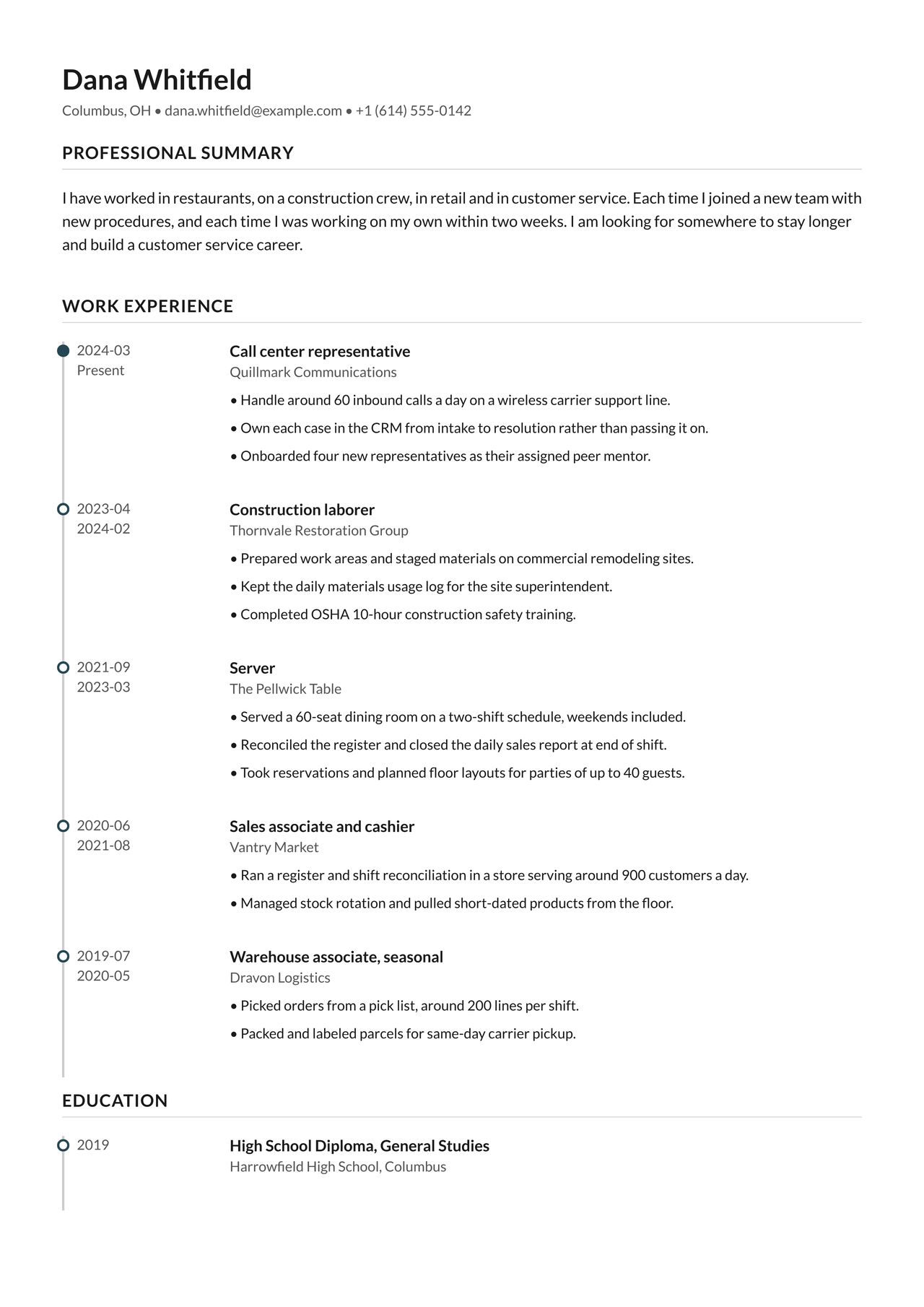
Timeline
Server, construction, call center
Five short jobs in five industries read as instability on a plain list. A timeline sets them as one story you can follow from top to bottom.
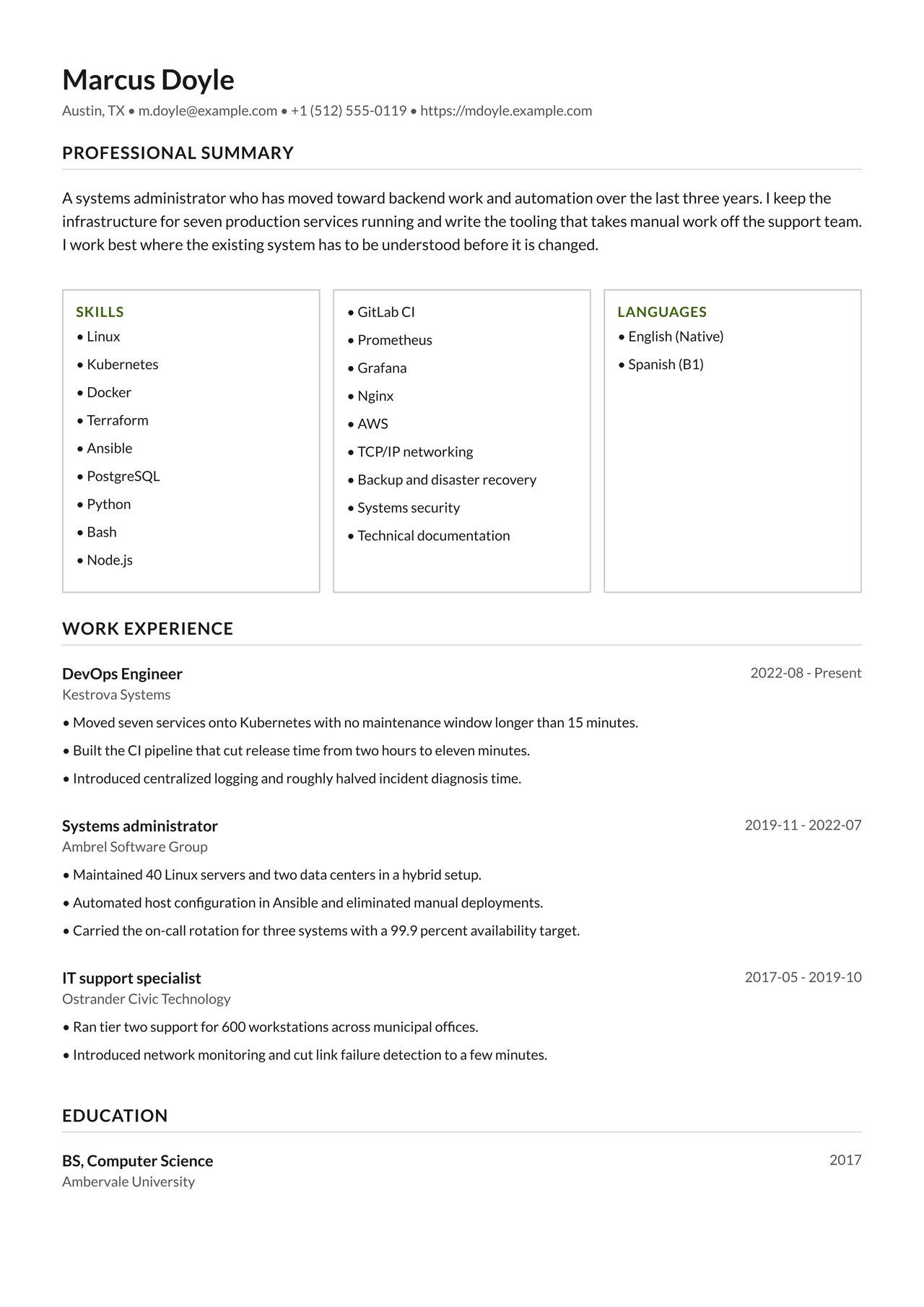
Competency Grid
Systems administrator
The grid lifts the technology list above the work history, so a recruiter sees it before they start reading. The right choice when your skills are the strongest part of your CV.
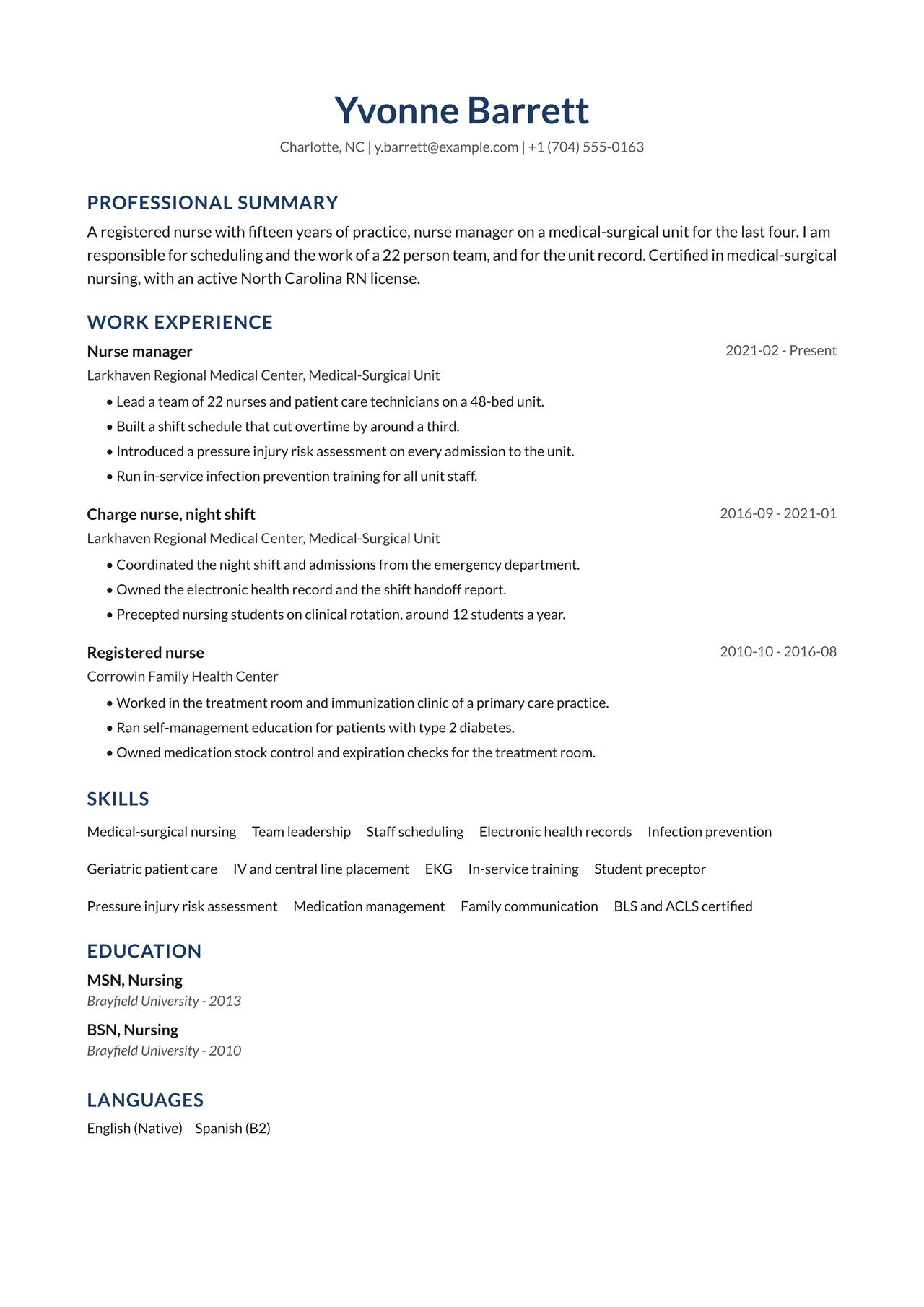
Executive
Nurse manager
A calm, formal layout with no ornament and room for a license number and a certification. It suits long tenure and specific credentials.
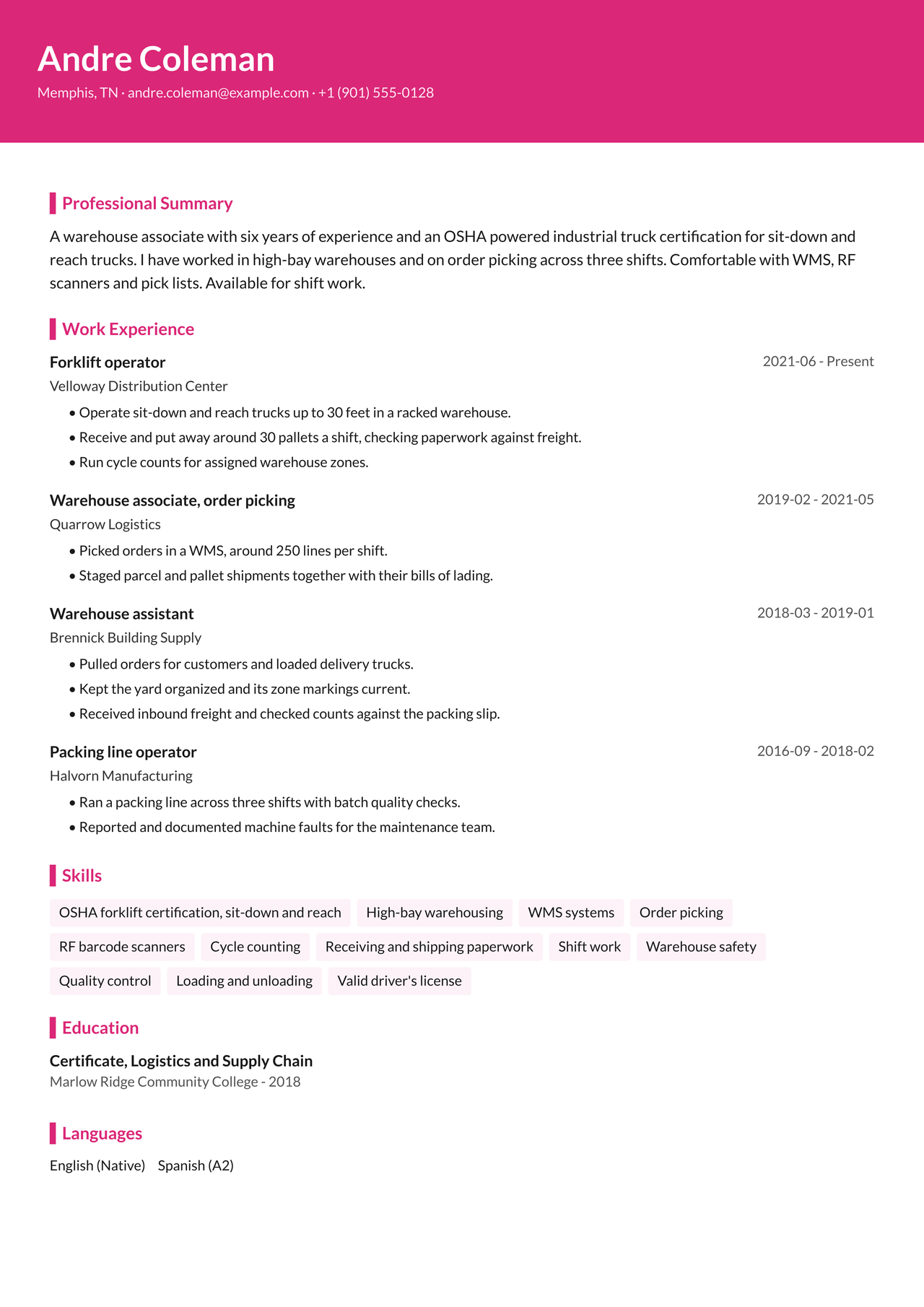
Vibrant
Forklift operator
A short CV that lands on a pile of forty similar ones. The color band across the head makes somebody stop at it, and the certifications are visible straight away.
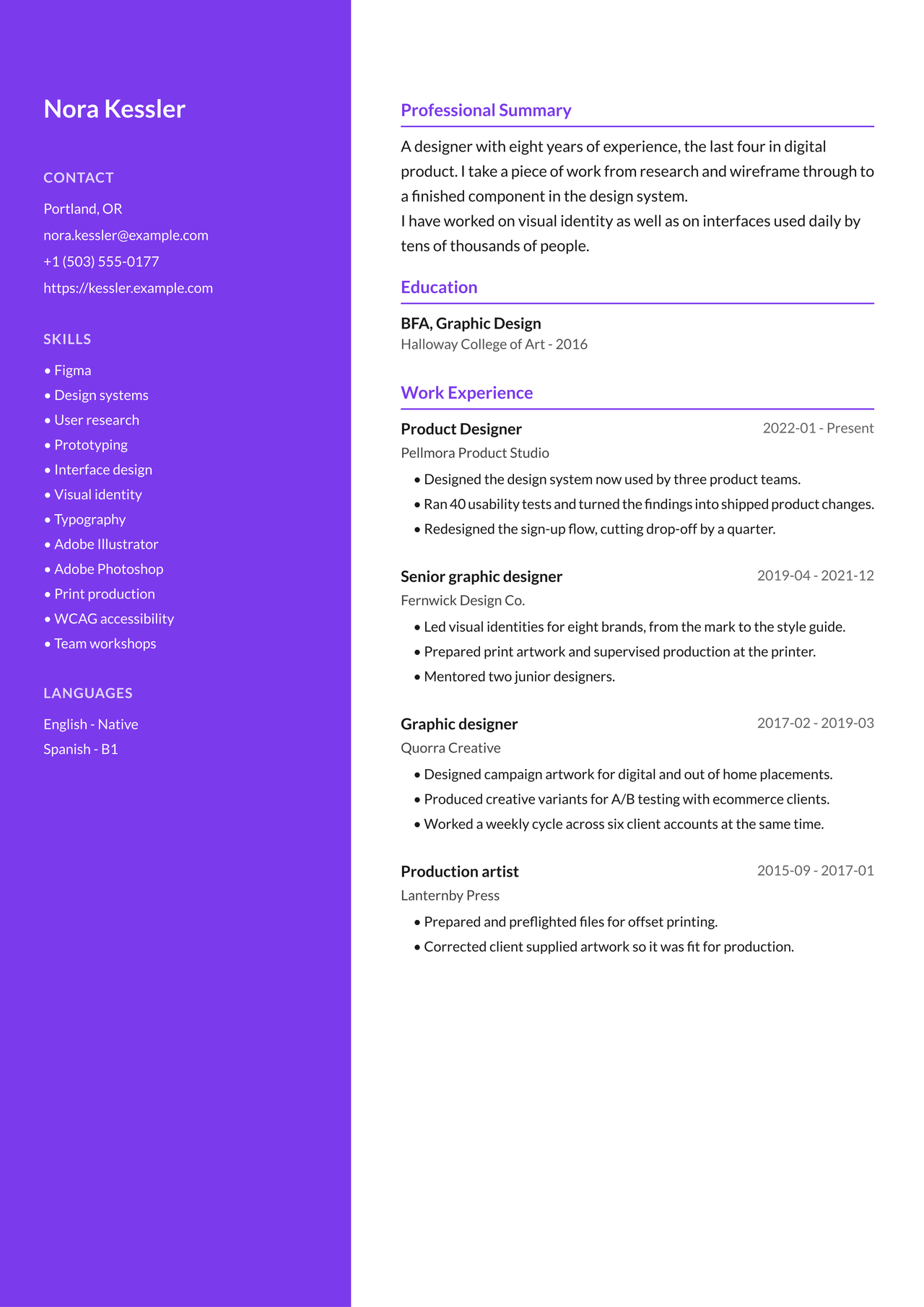
Designer
Product designer
A full-height sidebar gathers contact, tools and languages in one place. For trades where the look of the document is part of what you are showing.
That is five of 29. The free plan has Classic and Minimal, and on Pro and Max every template is one click away: the CV looks completely different and you retype nothing. For a corporate role, pick the one that walks straight through the screening software. For a design studio, pick the one someone stops at. The app tells you which is which. See them all in the app
See what an ATS reads from your CV
Upload a PDF and see in seconds whether a recruiting system can read its layout, fonts, sections, dates and contact details. No account.
The file stays in your browser and no AI reads it.
Check my CV for freeWith a free account, AI also reviews what the CV says and tailors it to a specific job offer.
- Text in the PDF readable
- Layout one column
- Section headings recognised
- Fonts embedded
- Dates two formats mixed
- Contact e-mail and phone
Your CV is encrypted, and even we cannot read it
Your profile, CVs and application history are encrypted on your device before they reach our server. When you use an AI feature, we send only what the task needs and leave out your email, phone number and address.
-
We do not hold the key to your saved CV, so we cannot open it.
-
The AI providers we use do not train their models on your data.
-
We show no ads and do not sell data.
Pricing
You start free and without a card. You pay only once the free limits start getting in your way.
Free
- 2 CVs a month
- 25 AI uses a month
- 20 saved postings
- One CV audit
- 2 CV templates: Classic and Minimal
- 1 card for employers
Pro
Recommendedper month
- 20 CVs a day
- 500 AI uses a month
- 200 saved postings
- Position discovery: 5 a month
- CV enhancement: 5 a month
- Cover letters: 5 a month
- CV audits: 5 a month
- Mock interviews: 10 a month
- Offer deep dives: 50 a month
- All CV templates
- Your own CV font and colours
Max
per month
- 20 CVs a day
- 500 AI uses a month
- 200 saved postings
- Position discovery: 10 a month
- CV enhancement: 10 a month
- Cover letters: 10 a month
- CV audits: 10 a month
- Mock interviews: 20 a month
- Offer deep dives: 200 a month
- All CV templates
- Your own CV font and colours
- 3 cards for employers
Cancel any time. You go back to the free plan and your data stays.
Common questions
What do I get for free?
2 CVs a month, 25 AI uses a month, 20 saved postings, 1 card for employers and one CV check. Your CVs use the Classic or the Minimal template. The limits renew on the 1st of each month, and we send a short e-mail when they do, which you can turn off. The CV check is the exception: you get it once and it does not renew. Form filling, application tracking and encryption work on every plan, the free one included.
Do I need a card to sign up? Can I cancel any time, and what happens to my data then?
No. You create an account with no card and stay on the free plan as long as you like. There is no trial that quietly turns into a payment after a week. You can cancel a paid plan at any time and go back to the free one. Your data stays, only the limits change. Deleting your data is a separate, deliberate step: Settings, then delete account.
Can Cvizo apply to jobs for me?
Yes. There are two modes. The default is fill and review: Cvizo fills in the form in your own browser and hands it back to you, so you check it and press send yourself. The other is full auto, which you have to switch on. Then Cvizo presses send, but only when it judges the form to be complete. When it is not, it stops and leaves the filled-in form for you to finish.
Do you read my CV?
Not the CVs you store. Your profile, CVs and application log are encrypted on your device before anything reaches us, and we do not have the key that opens them.
AI features are the exception. When you generate or check a CV, the text that task needs passes through our server to an AI model. We do not store it and nobody at Cvizo reads it. The next question has the details.
We collect statistics on which features you use only with your consent. There is no CV text, no posting text, no search terms, no name, email or phone number. You withdraw consent in Settings, under Privacy & Analytics. The choice is saved on your account, so it applies on every device.
Start with one CV for a job you like
The account is free and needs no card. You can make your first CV as soon as your profile is filled in.
Create a free accountThe account is free and needs no card.